Android-based panel computers are becoming one of the most versatile elements of corporate IT infrastructure. In industries where speed, flawless operation, and seamless communication with systems are paramount, Android panels are performing better than ever.
Below are five functionalities that most often determine their advantage.
1. Multifunctionality that replaces several devices at once
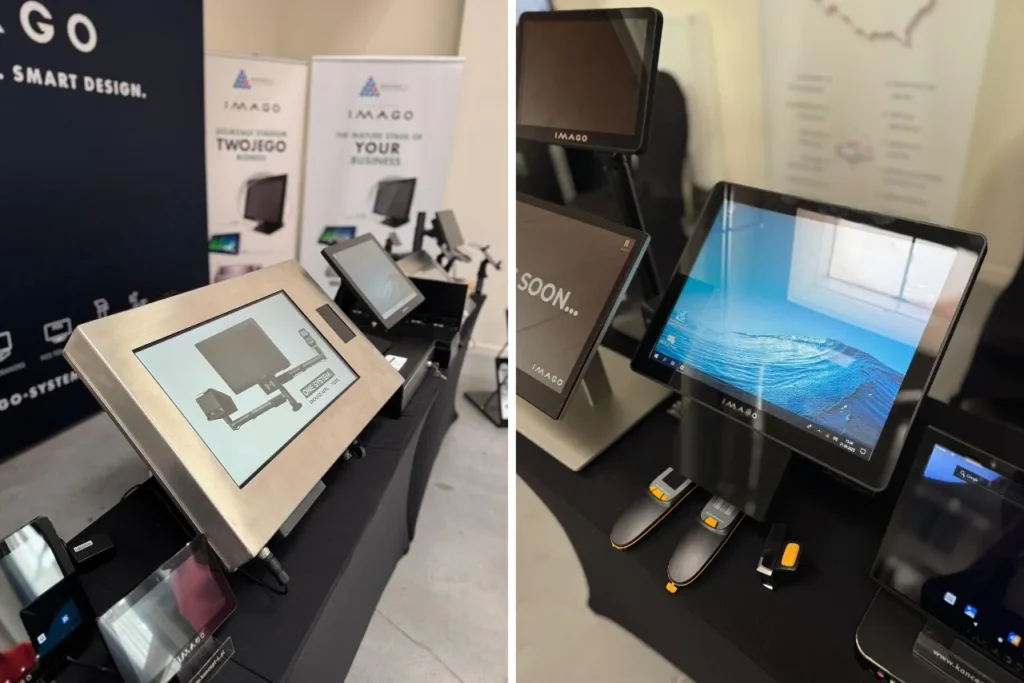
Modern PC Android panel can function as both an information point and an operational terminal. In practice, this means that a single device supports:
- checking prices in large stores,
- presenting promotions and product recommendations,
- product search and filtering by allergens,
- booking conference rooms,
- handling coupons and lotteries (in combination with a scanner),
- warehouse tasks related to goods identification.
It is this diversity that makes Android panels increasingly popular in retail chains, warehouses and service points – they can be freely programmed and quickly switched to a new function when the business requires it.
2. Accessories that really enhance the device's capabilities
The panels themselves are the foundation. Only accessories transform them into a fully-fledged service station. Depending on your needs, they can be expanded with:
- 2D code readers (e.g. Ribs SE2707 or SE4107) – ideal for working with coupons, products and receipts,
- NFC reader – handling employee IDs, customer cards, tickets,
- LED side panels – visual messages, device status,
- PoE power supply – installation in places where supplying power would be a problem.

3. Two touch technologies, i.e. comfort in all conditions
The work environment dictates the conditions. Warehouses require the durability of work gloves, while elegant boutiques require high responsiveness and aesthetics. Therefore, two variants are offered:
- resistive screen – works well where employees use gloves and dirt resistance is needed,
- capacitive screen – perfect for places where quick, light interaction is important.
So you can choose the touch exactly for the process, and not the other way around.
4. Wide range of sizes – from compact kiosks to large information panels
One of the biggest advantages Android panel computers is their availability in many sizes:
- 7″
- 10.1″
- 15.6″
and extended variants for specific implementations:
- 11.6″
- 23.8″
- 27″
- 32″
- 42.5″
This allows the same software to run on both a small kiosk in a store and a large information board in the customer service area.
5. An ecosystem of applications dedicated to retail
Android opens up access to a rich world of applications – including those written specifically for the retail industry. IMAGO A series micro-kiosks work great with:
- price checker applications,
- tools for searching products and variants,
- loyalty systems,
- lottery gaming applications,
- self-checkout solutions in smaller points,
- applications for employees (e.g. quick status verification, internal messages).
This means that the panel is not just a display – it becomes an element of a broad sales environment that can be developed in line with the company's needs.

Where do Android PC panels show their true value?
By combining Android's flexibility, a wide range of accessories, and the ability to customize the size to suit a specific application, panel computers become a tool that can be incorporated into virtually any work environment.
Companies gain a device that not only improves customer service and logistics processes but also allows them to quickly respond to changing market needs. This is why Android panels are increasingly becoming the foundation of modern implementations – not as an add-on, but as a true operations center that grows with the business.
So if a company is looking for a solution that combines simplicity, scalability, and readiness to work from the first launch, these devices are most often the right choice.
FAQ – frequently asked questions
What are Android panel computers most often used for?
Android panel computers are primarily used in retail, catering, warehouses, service outlets, and office spaces. They can function as information kiosks, price checkers, loyalty terminals, room reservation panels, or warehouse support stations.
Can the Android PC panel be expanded with additional modules?
Yes. Depending on the application, the device can be equipped with features such as a 2D barcode reader, NFC module, LED side panels, or PoE power supply. This allows the panel to be tailored to specific operational processes.
What is the difference between a resistive and a capacitive screen?
Resistive screens are ideal for industrial and warehouse environments where operators wear gloves or operate in more challenging environments. Capacitive screens offer greater responsiveness and a more aesthetically pleasing user experience, making them often used in retail and customer service environments.
What sizes of Android panels are available?
Android panel computers are available in a variety of sizes, from compact 7-inch and 10.1-inch models to large 27-inch, 32-inch, and 42.5-inch panels. This allows the device to fit into both a small kiosk and a large information desk.
Is Android suitable for professional use?
Yes. Android provides access to a broad ecosystem of business applications and the ability to integrate with sales, warehouse, and loyalty systems. As a result, Android panels are now also used in professional retail and industrial implementations.
Can the Android panel work as a price checker?
Yes. This is one of the most common uses for this type of device. After connecting a barcode scanner, the panel can allow you to quickly check prices, product availability, promotions, and allergen information.
What are the advantages of Android panels compared to classic PC stations?
Android panels take up less space, are easier to use, energy-efficient, and easy to implement. In many cases, a single device can replace several separate systems, simplifying workstation organization.
Are Android panel computers suitable for continuous operation?
Yes. Models designed for business use are designed for intensive use in shops, warehouses, and service centers. Depending on their design, they can also be adapted to operate in more challenging environments.