

Android POS terminal. Where is it best suited and how to choose the right model?
At the point of sale, a computer has one primary role: it shouldn't interfere with customer service. The employee should quickly find a product, take an order, check the price, and move on to the next transaction. When the system is slow or several separate devices are required to complete a simple task, the problem becomes apparent, especially when a queue forms at the checkout.
Therefore, choosing a POS terminal should be considered primarily through the lens of workflow. It's not just the screen size or processor that matters, but also the operating system, available ports, the ability to connect additional devices, and how the terminal will be used by employees.
One of the available options is POS terminals with Android. What applications are they best suited for, and when should you choose them over a Windows-based device?
What operations are Android POS terminals used for?
Android is well-suited to positions where a sales application is the primary tool. Employees use the touchscreen interface to select products, take orders, check sales information, or utilize additional features provided by the POS system.
This solution can be used in stores, restaurants, cafes, service points, and hotels, among others. The terminal can handle sales, orders, loyalty programs, inventory control, or other functions, provided they are available in the software used.
Android can be particularly convenient where the sales system is designed as an app or web-based solution. The touchscreen interface reduces the number of additional devices needed at the point of sale.
Android or Windows in the POS system?
There's no single answer that works for every company. The choice of system should be based primarily on the software that will run on the terminal.
Android It will be a good solution for systems based on mobile apps, web solutions, and software designed specifically for touchscreen devices. It can be convenient for simple sales stands, restaurants, and service points.
Windows It's more often chosen when a company already uses specific desktop software, Windows-based applications, or devices that require specific drivers. It can also be a natural choice for more complex workstations that are designed to function similarly to a traditional computer.
Before purchasing, it's worth checking the requirements of the POS system you're using. Even a well-equipped terminal won't be a suitable solution if it doesn't support the software your company uses.
Where can an Android POS terminal be a good solution?
An Android terminal will be especially useful where the employee mainly uses the touchscreen interface of the sales application.
In a store, it can be used to process transactions and check products. In a restaurant, it can be used as an order-taking station. In a café, it can manage sales and loyalty programs. In a service point, it can combine customer service with access to the reservation or sales system.
A common feature of such applications is the need for quick access to specific functions. Employees no longer need a traditional computer environment with numerous programs running in the background. Instead, they primarily use an application designed to handle a given process.
What parameters should you pay attention to when choosing a POS terminal?
The terminal specification should be matched to the software and devices with which it will work.
Screen
In a larger sales stand, a screen that allows you to conveniently display a list of products, categories and additional information is useful. 15.6 inches in Full HD resolution provides a large work surface and can be a good solution for workstations where an employee uses a terminal throughout the entire shift.
It's also worth paying attention to the user interface. The PCAP touchscreen allows you to navigate the interface without having to use a mouse.
Processor, RAM and memory
POS terminal It doesn't need to have the specs of a computer designed for demanding games or graphics processing. However, it should ensure the smooth operation of the sales system and applications used at a given workstation.
In the case of an Android device, it's worth checking the processor, RAM, and internal memory. With more complex software or simultaneous use of multiple functions, a larger amount of resources may be important for user comfort.
Ports and communications
Before purchasing, it's a good idea to list all the devices that will be connected to the terminal. Depending on the station, these may include a barcode scanner, printer, cash drawer, additional screen, or other accessories.
Therefore, USB, Ethernet, HDMI ports, and connectors for peripherals are useful. For POS stations, the availability of appropriate serial ports and power for selected accessories can also be important.
What accessories can be connected to the POS terminal?
The terminal may be the central device of the station, but its functionality often depends on additional equipment.
In sales, the following are often used:
- barcode and 2D code scanners,
- receipt printers,
- cash drawers,
- card readers,
- RFID and NFC readers,
- MSR readers,
- additional displays for customers.
Not all accessories will be needed at every point of sale. Therefore, it's important to first determine how the point will operate, and only then select the specific terminal and additional devices.
What is the additional customer display used for?
The employee and customer don't have to use the same screen. A secondary display can present the customer with information about the current transaction, while the employee uses the full POS system interface on the main screen.
Depending on the software, the customer's screen may display, among other things, products added to the cart, prices, transaction totals, and messages.
The second screen can also be used to present promotional content. When not needed for transaction processing, it can display information about offers or promotions.
When choosing a terminal, it is worth checking not only the possibility of connecting an additional display, but also its available sizes and mounting method.
IMAGO AL-615A as an example of an Android POS terminal
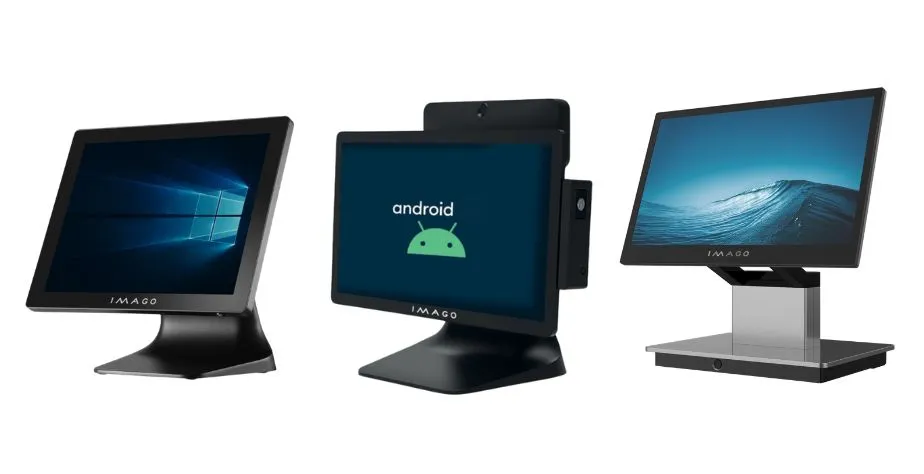
One of the models intended for such applications is IMAGO AL-615A. The terminal is equipped with 15.6-inch PCAP touchscreen with 1920 × 1080 resolution and processor Rockchip RK3568. The user has 4 GB of RAM and 64 GB of flash memory at their disposal.
The device works under control Android 11 and offers a set of ports including five USB 2.0 ports, 1 Gb/s Ethernet, HDMI and a 12V RJ12 connector.
The AL-615A can also be expanded with additional equipment. Depending on the configuration, available options include an MSR reader, a fingerprint/NFC reader, and an additional customer display. The latter can have a diagonal of 11.6 or 15.6 inches, and in the selected configuration also a touch function.
A terminal configured in this way can be tailored to a specific sales point, instead of limiting the user to one pre-defined configuration.
What to check before purchasing an Android POS terminal?
When choosing a terminal, it's worth starting with the sales process itself. What software will be used? How many devices will need to be connected? Will the employee only use a touchscreen? Should the customer have their own display? Will the terminal be in use for many hours a day?
Only on this basis is it worth comparing processors, memory, screen size or number of ports.
Android POS Terminal It can be a convenient solution for stores, restaurants, and service points, but its usefulness depends primarily on the hardware-software match and the station organization. A well-chosen configuration allows you to limit the number of separate devices and create a sales station that meets the company's actual needs.
